
365-Day Content Calendar
A post idea for every day of 2027, with the year's key days from official lists
- From MySmartCoPilot
- XLSX
- ICS
- CSV
- Text
- 10 sheets
- 69 pages
Plan a year of posts without a blank page: one idea a day with a hook, steps, a call to action and an example, in your own words, and the key days of 2027.
Price ₹99 / $2.99 One-time payment, any tax included
Download straight after paying. Yours to keep.
What’s inside
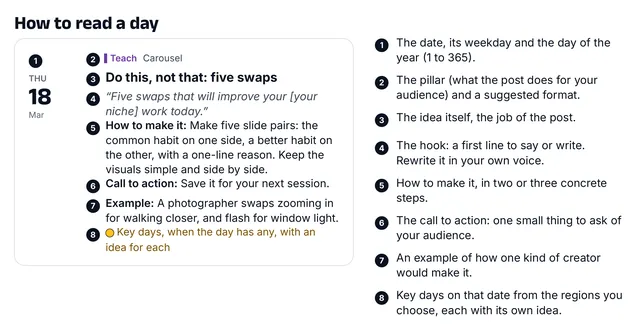
- 365 post ideas, one for every day of 2027each with a hook (the first line), how to make it in two or three steps, a call to action and an example from one kind of creator; six content pillars on a weekly rhythm, eight formats and a theme for each month
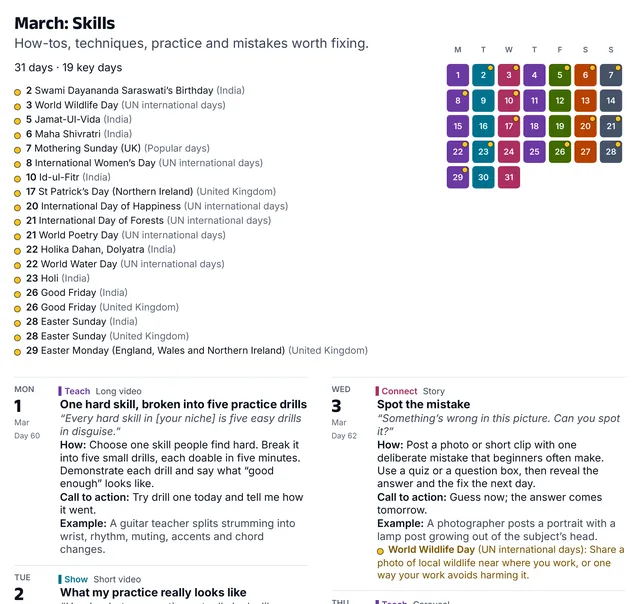
- 158 key days from official listsIndia's central government holidays and restricted holidays and Teachers' Day (50), US federal holidays and observances (17), UK bank holidays and festivals (16), 69 UN international days and 6 popular days, each with its own idea and its source
- The workbook: 10 sheetsSettings, a 365-day Calendar with your own columns for platform, status, time, notes and link, Month view, Week planner, a Dashboard with 2 charts, Key days, Pillars and formats, Help and Licence; type your niche, audience and offer once and every idea uses your words
- The guide: 67 pages on A4, 69 on US Letter (PDF)how to read a day, five-minute setup, how to add the ideas to a calendar app, how to make an idea your own with a worked example, good practice, all 365 ideas month by month, the key days and their sources
- Printable planner: 18 pages (PDF, A4 and US Letter)the year at a glance, 12 month pages with every day's idea, pillar and format, a week plan and a post plan
- 6 calendar files (.ics)the 365 ideas as all-day events, and the key days of India, the US, the UK, UN days and popular days, each to import into a calendar of its own, marked as free time
- 2 CSV filesall the ideas and all the key days, for any app that imports CSV
- Start here, licence and changelogas text files
| File | Format | Size |
|---|---|---|
| MySmartCoPilot-Content-Calendar-2027-v1.0.xlsx | XLSX | 251 KB |
| MySmartCoPilot-Content-Calendar-2027-Guide-A4-v1.0.pdf | 1.3 MB | |
| MySmartCoPilot-Content-Calendar-2027-Guide-Letter-v1.0.pdf | 1.3 MB | |
| MySmartCoPilot-Content-Calendar-2027-Printable-A4-v1.0.pdf | 584 KB | |
| MySmartCoPilot-Content-Calendar-2027-Printable-Letter-v1.0.pdf | 585 KB | |
| MySmartCoPilot-Content-Calendar-2027-Ideas-v1.0.ics | ICS | 301 KB |
| MySmartCoPilot-Content-Calendar-2027-Key-Days-India-v1.0.ics | ICS | 46 KB |
| MySmartCoPilot-Content-Calendar-2027-Key-Days-US-v1.0.ics | ICS | 12 KB |
| MySmartCoPilot-Content-Calendar-2027-Key-Days-UK-v1.0.ics | ICS | 10 KB |
| MySmartCoPilot-Content-Calendar-2027-Key-Days-UN-v1.0.ics | ICS | 41 KB |
| MySmartCoPilot-Content-Calendar-2027-Popular-Days-v1.0.ics | ICS | 4 KB |
| MySmartCoPilot-Content-Calendar-2027-Ideas-v1.0.csv | CSV | 170 KB |
| MySmartCoPilot-Content-Calendar-2027-Key-Days-v1.0.csv | CSV | 61 KB |
| MySmartCoPilot-Content-Calendar-2027-Start-Here-v1.0.txt | Text | 4 KB |
| MySmartCoPilot-Content-Calendar-2027-Licence-v1.0.txt | Text | 4 KB |
| MySmartCoPilot-Content-Calendar-2027-Changelog-v1.0.txt | Text | 3 KB |
Works with
| App | Versions | Checked |
|---|---|---|
| Microsoft Excel | 2016 or later on Windows and Mac; Excel for the web The .xlsx format; its 16 functions are all on Microsoft's Excel function list with no version mark; no macros, add-ins or links to other files | Made for |
| Google Sheets | in a web browser Upload the file to Google Drive and open it with Google Sheets. Its functions are all on Google's function list; Excel's sheet protection does not carry over, so type only in the blue cells | Made for |
| LibreOffice Calc | 26.8 on macOS LibreOffice Calc recalculated all 3,392 of the workbook's formulas in 82 test cases, from blank settings to every month, week and status, and matched our reference figures in every cell | Tested |
| Google Calendar, Calendar on a Mac and Outlook | any calendar app that imports .ics files Six iCalendar files checked against the standard (RFC 5545); the guide shows the import steps for these three apps | Made for |
| PDF readers | any PDF reader on a computer, tablet or phone The guide and the planner are tagged PDF/UA-1 files with bookmarks, real text and alt text for every figure | Made for |
| Printing | A4 and US Letter paper The guide and the printable planner come in both sizes; the planner prints landscape | Made for |
“Tested” means we opened and checked the file in that app and kept the record. “Made for” means it follows that app’s documented format. No DRM: the file is yours to keep.
Try a sample
The Week planner for the week starting Monday 4 January, as the workbook computes it. Type your niche, audience and offer once on the Settings sheet and every idea uses your words.
| Day | Pillar | Format | Idea for you | Key days |
|---|---|---|---|---|
| Mon 4 Jan | Teach | Carousel | Start here: the five basics of [your niche] | UK: 2nd January (substitute day) (Scotland); UN: World Braille Day |
| Tue 5 Jan | Show | Short video | Your workspace, reset for the new year | |
| Wed 6 Jan | Connect | Story | What do you want to learn about [your niche] this year? | |
| Thu 7 Jan | Teach | Short video | The beginner mistake I see most often | |
| Fri 8 Jan | Showcase | Photo post | Before and after: one small project from start to finish | |
| Sat 9 Jan | Share | Text post | Why I started | |
| Sun 10 Jan | Offer | Carousel | Who [your offer] is for, and who it isn't for |
You type here: the shaded cells are the ones you fill in.
- Monday's hook (the first line): New here? These five basics of [your niche] will save you months of confusion.
Every number here was worked out by the workbook itself, from the sample data it ships with.
5 of the 69 pages shown here.
How it helps
A year of ideas, ready to make
Every day of 2027 has its own idea, written to be made the same day: a hook to open with, how to make it in two or three steps, a call to action and an example from one kind of creator. The week follows six content pillars, Teach on Monday and Thursday, Show on Tuesday, Connect on Wednesday, Showcase on Friday, Share on Saturday and Offer on Sunday, so you help, show your process, start conversations, share finished work and still make one honest offer a week. Each month has a theme, from fresh starts in January to a look back in December. Ideas name formats, such as a short video, a carousel or a newsletter, never an app, so they fit wherever you post.
Your words in every idea
Type your niche, who it's for and what you offer once on the Settings sheet: the workbook puts your words into every idea, hook, step and key-day idea. Choose the days you post and the key days you want to see. The Week planner shows any week, the Month view any month, and the Dashboard counts what you posted by month, pillar, format and platform, with two charts.
Key days from official lists
158 key days of 2027, each with an idea for the day: India's central government holidays and restricted holidays and Teachers' Day, the United States' federal holidays and observances, the United Kingdom's bank holidays in all three of its divisions, 69 UN international days and 6 popular days. Each names its source: an official list for 2027 or, for a popular day, its custom's own rule. Festivals that depend on the moon are marked, and religious and solemn days get a greeting or a quiet post, never a sales push.
On screen, in your calendar or on paper
The same calendar comes as a workbook for Microsoft Excel, Google Sheets and LibreOffice Calc; as six calendar files to import into Google Calendar, Calendar on a Mac or Outlook, each into a calendar of its own; as CSV files; as a guide of 67 pages; and as a printable planner of 18 pages. The guide and the planner come in A4 and US Letter.
For your own posts and your clients'
The commercial licence lets you make posts, captions, videos and e-mails from the ideas, as written or edited, for yourself and for clients, and plan clients' content with the workbook. The calendar itself stays yours: it isn't to be shared or resold.
Checked before it is sold
LibreOffice Calc recalculated the workbook's formulas in 82 test cases, and a second, independent engine in the same cases; both matched our own reference figures in every cell. Every key day was checked against its official list (a popular day against its custom's rule), the calendar files against the iCalendar standard, and the PDFs against the PDF/UA accessibility standard.
Licence
Commercial licence. Use it for yourself, in your business and in finished work for your clients.
- Personal and business use
- Client work allowed
- Lifetime use of this version
- Free fixes
- No resale
Lifetime use of the version you download. Fixes of errors in your edition are free from your order page. Read the full licence.
Refunds and your rights
Because the file is ready the moment you pay, we don’t refund a purchase once its download has started, unless the file is faulty or not as described: then we fix it, send you a corrected file or refund you. If you live in the EU, the EEA or the UK, you can withdraw from your purchase until your download starts, and you keep every right the law gives you.
Your legal guarantee: if a file is faulty or not as described, we repair it, replace it or refund you.
Delivery and paying
Download straight after paying, on this page and by e-mail. Nothing is shipped. Sold in the countries where a way to pay shows on this page.
You can download your files again from your order page whenever you need them. If we ever stop offering downloads, we’ll e-mail you at least 90 days before so you can save your copy.
- In rupees: UPI, cards or netbanking on Razorpay’s secure page. MySmartCoPilot sells the file to you.
- In US dollars: card or wallet with Dodo Payments, which sells the file to you as merchant of record and e-mails your receipt or invoice.
- In US dollars with PayPal, where it is offered. MySmartCoPilot sells the file to you.
Bought once, separately from passes. How the Digital Store and passes differ.
Questions
Is it only for 2027?
The dates and key days are for 2027. The ideas don't expire: the Day column numbers them from 1 to 365, so you can reuse them in any year, in order or in any order you like.
Does it work in Google Sheets?
Yes. Upload the workbook to Google Drive and open it with Google Sheets. Google Sheets doesn't keep Excel's sheet protection, so type only in the blue cells.
Which platforms is it for?
Any. The ideas name formats (short video, carousel, photo post, story, long video, live, text post and newsletter), not apps, and the workbook's platform list takes the names you use.
Can I use it on a phone?
The guide, the planner and the calendar files open on phones and tablets. The workbook is made for a computer screen.
Are the festival dates final?
They come from the official lists for 2027. Some festivals depend on the sighting of the moon, and India's government may move those dates at short notice; regional dates can also differ. Check your local list before you plan anything that can't move.
Can I use the ideas for my clients?
Yes. The commercial licence covers posts you make for yourself and for clients. You may not share or resell the calendar itself.
What if I find a mistake?
Tell us at support@mysmartcopilot.com. Fixes of this edition are free from your order page.
Versions
- Version 1.0: First edition.
Related
Prefer it online?
- Instagram Feed Planner: Reorder and pin your local planned posts, adjusting each 3:4 thumbnail crop.
- Social Media Post Maker (Templates, Brand Kit, Resize & Animate): Add your words, photo and brand to a template, and see it in every size, still or moving.
- Best Time to Post Analyzer (From Your Own Data): Your posts, your audience: the days and hours when your own posts do best.
- Hashtag Generator (Your Words + AI Ideas): Clean hashtags from your own words, capped to each platform’s rules — plus AI ideas.
More files in Creator Resources.
Microsoft, Excel and Outlook are trademarks of the Microsoft group of companies. Google Sheets and Google Calendar are trademarks of Google LLC. Apple and Mac are trademarks of Apple Inc., registered in the U.S. and other countries and regions. LibreOffice is a registered trademark of The Document Foundation. MySmartCoPilot is not affiliated with or endorsed by them. All other trademarks are the property of their respective owners.