Turbo Courier: Arcade Weather
Chase the storm, film the frames, pick the right tool.
Pro game
Arcade
Turbo Courier: Arcade Weather
Chase the storm, film the frames, pick the right tool.
This game could not load.
About Turbo Courier: Arcade Weather
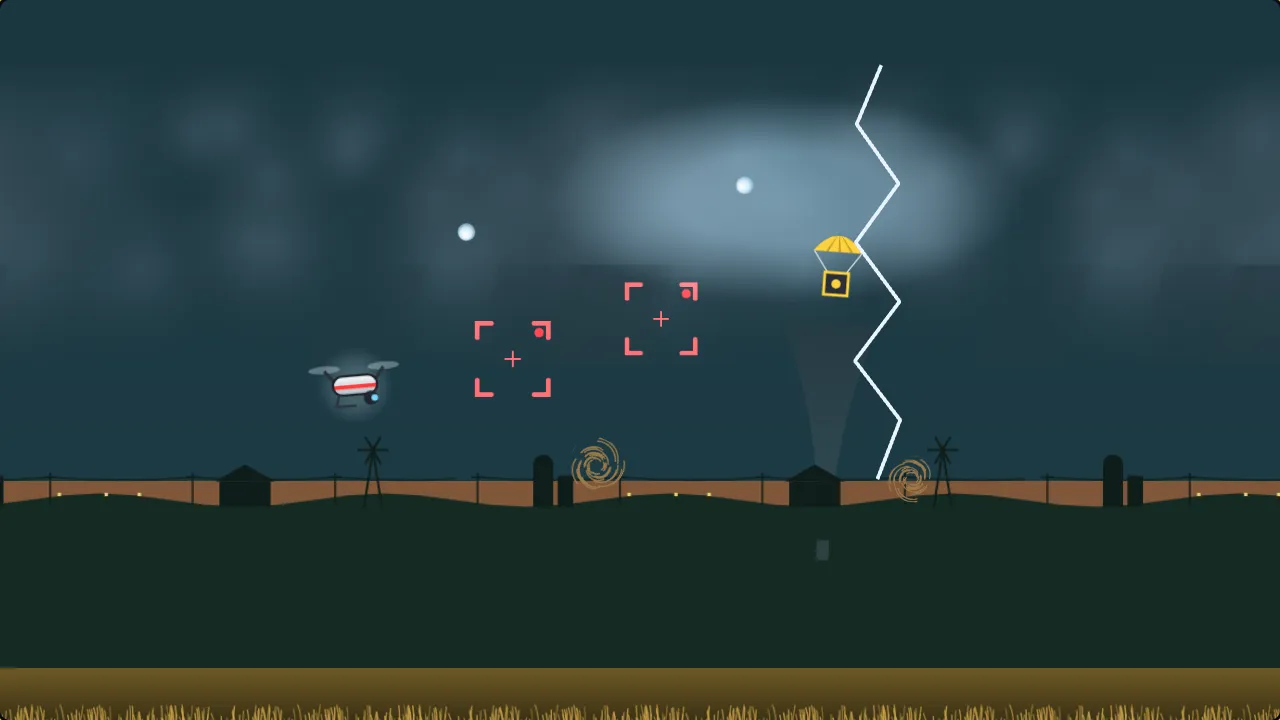
Turbo Courier: Arcade Weather is an arcade flight score chase set on a storm-chasing broadcast. You fly Skye, the channel's white-and-red camera drone, low over a wheat prairie ahead of a towering supercell, live on air. Hold Thrust to climb and let go to sink, and fly through the glowing shot frames the producer calls. Frames one after another build a chain and climb the multiplier.
The storm fights back. Tumbling hay bales, fence planks and road signs ride the wind, hail falls, and lightning strikes are called on the radar a second before they land. Each hit costs a battery cell; three and the drone is down, though every new round of weather gives one cell back.
Every round of twenty seconds the storm turns, and the weather changes the pattern: gusts shove the drone and throw debris across, lightning brings the strike calls and the hail, and fog hides the far sky until things are close. Supply drops under little parachutes fill the kit bag with charges for three tools, each made for one weather: the Anchor holds you steady in the wind, the Rod takes a strike and turns it into the shot of the day, and the Radar lights up everything in the fog. Charges are few, so when to spend them is the game. Eight frames in a chain put the broadcast live: the red light comes on, the supercell lights up from inside, the funnel shows and every frame counts double. Each run draws a show, the daily broadcast is the same storm for everyone, and Pace, Assist, a toggle for Thrust and strike calls are in the settings. Scores and badges stay in this browser.
How to play
- Hold Space, Up, W, Ⓐ or the Thrust button to climb; let go to sink; Down or S dives. Thrust can be a toggle in Settings.
- Fly through the shot frames. Frames one after another build the chain and the multiplier; eight in a chain go live for double points.
- Debris, hail, lightning and a hard landing cost battery cells. Three and the drone is down; each new round gives one back.
- Each round brings gusts, lightning or fog. Press E, Enter or the Weather tool button to spend the tool for the weather: Anchor, Rod or Radar.
Controls
- Hold Space, Up, W, Ⓐ, the Thrust button, or touch and hold the sky — climb
- Down, S or D-pad down — dive
- E, Enter, Shift, Ⓧ, RB or the Weather tool button — use the tool for the weather; 1, 2, 3 — Anchor, Rod, Radar
- P, Escape or Start — pause
Frequently asked questions
What are shot frames?
The glowing viewfinder brackets in the sky: the producer's calls. Fly through one to film it. Frames one after another build the chain, and frames in the fog are worth half again.
What does each tool do?
The Anchor holds the drone steady against the wind for four seconds and pushes debris aside. The Rod takes the next lightning strike near you and turns it into the shot of the day. The Radar lifts the fog for five seconds and draws frames toward you.
How do I get more charges?
Fly through the supply drops hanging under little parachutes. Each adds one charge to the bag, up to three per tool. Drops tend to bring the tool the weather needs.
How do I dodge lightning?
Strikes are called a second ahead: a dashed circle fills in where the flash will land, and a marker shows at the edge of the screen. Climb or dive out of the circle before it lands.
Is there an easier way to play?
Yes. Pace set to Relaxed slows the whole storm, Assist shrinks the strikes and debris a little and adds a breather between waves, and Toggle instead of hold turns Thrust into a press.
Does the game save?
A broadcast you leave is kept in this browser and picks up at the start of its wave, kit bag and all. Best scores, the daily result and badges stay in this browser and are never uploaded.
Related games
All Arcade games → Snake Eat the prisms, chain them for big points, and never bite your own tail. Pro game
  Pong Rally the ball past the computer paddle to win the match. Pro game
  Breakout Bounce, break and clear every brick before you run out of lives. Pro game
  Whack-a-Mole Bonk the moles before they duck back down, and catch the golden one for a Frenzy. Pro game
  Neon Pulse: Score After Dark Scan the parcels, bank the stack, and never let the night shift beat you. Pro game
  Neon Pulse: One More Run Sixty seconds, one rail, a ring of broken robots. Then one more run. Pro game