Turbo Pulse: Arcade Weather
Slide the dish, save the cell from the lightning, and open the Eye.
Pro game
Arcade
Turbo Pulse: Arcade Weather
Slide the dish, save the cell from the lightning, and open the Eye.
This game could not load.
About Turbo Pulse: Arcade Weather
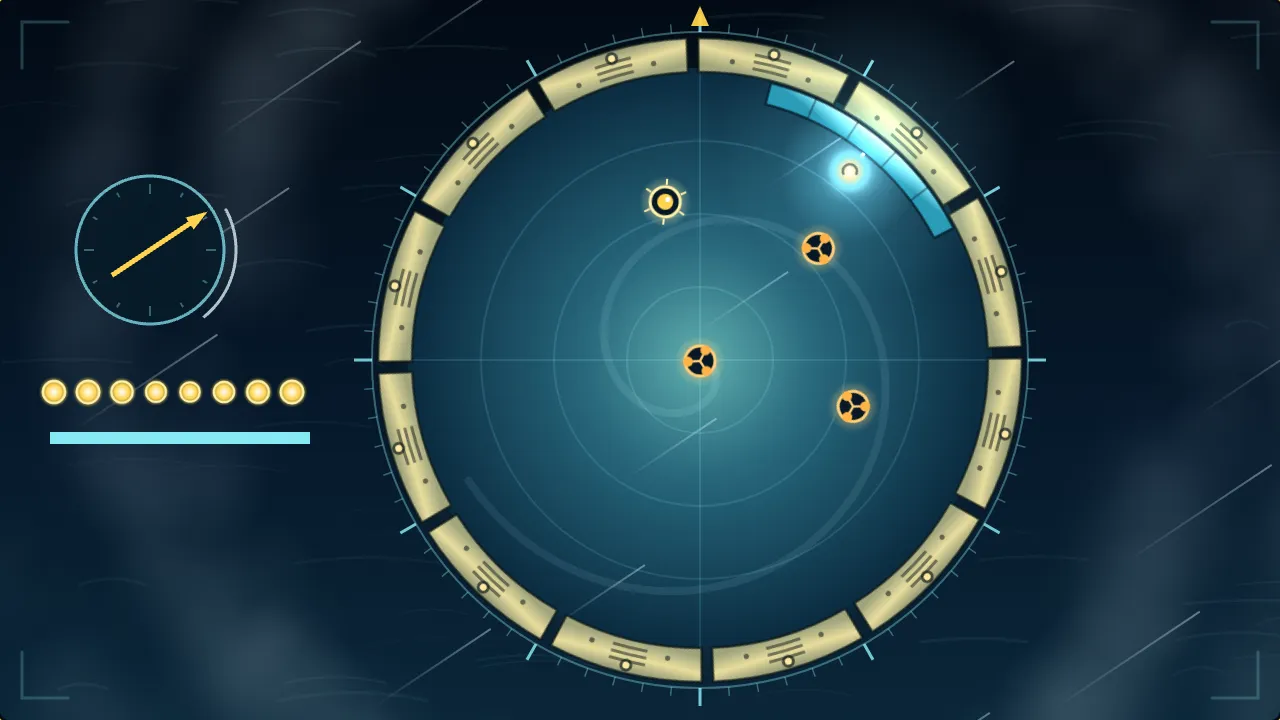
Turbo Pulse: Arcade Weather is a circular arcade game set in a storm-chasing broadcast. The satellite camera looks straight down into a hurricane: a calm round eye, ringed by twelve steel segments that turn with the storm. One bright storm cell bounces around inside the eye, and your only tool is the dish, a short bright arc that slides along the rim. Wherever the cell meets the dish it bounces back, and the part of the dish it lands on decides which way it goes, so the dish is also how you aim at the readings, small anemometers floating in the calm.
The ring is what hurts. Its segments take turns to charge, blinking amber, and then to strike, crackling violet, and a cell that touches a live segment is struck. Segments that are not lit are harmless, so the skill is to guess where the cell will arrive and be there when it matters. A save on a charging or live segment pays well, and a run of eight catches without a single plain bounce opens the Eye: the clouds part, the ring falls quiet and every reading pays double.
A season is seven rounds, and each brings its own weather. Crosswinds drag the cell off its line, heavy rain makes the dish slide on after you let go (hold Anchor to stop it dead), and sea fog hides the rim except close to the dish. Later rounds mix them, and a front you let go by comes back already charging. You have three cells. Each night adds a rule of its own, today’s season is the same for everyone, and your best broadcast replays as a ghost cell beside you.
How to play
- Slide the dish round the rim with the left and right arrows or A and D, a controller’s left stick, or the on-screen pair.
- Hold Space, Enter, the down arrow, Ⓐ or the Anchor button to stop the dish at once.
- Catch the storm cell on the dish. The part of the dish it lands on sends it left or right, so use that to steer it into the readings.
- Watch the ring: amber segments are charging, violet ones are live. A live segment strikes the cell; three strikes end the season.
- Catch eight times in a row, with no plain bounce between, and the Eye opens: no strikes for a few seconds and readings pay double.
- Clear every reading in a round for a bonus. The weather changes each round: wind, rain, fog and the storms that mix them.
Controls
- Left and right arrows or A and D, left stick, the on-screen pair — slide the dish
- Space, Enter, down arrow, Ⓐ or RT, the Anchor button — hold the dish still
- P, Escape or Start — pause
Frequently asked questions
How do I aim the storm cell?
You aim with the dish. The cell bounces back from wherever it meets the dish, and the further toward one end of the dish it lands, the more sideways it is thrown. Landing in the middle sends it straight back.
What do the segments do?
Each segment blinks amber as it charges and then crackles violet and strikes. A cell that touches a live segment is struck. A segment that is not lit is harmless, and the cell simply bounces off it.
What opens the Eye?
Eight catches in a row with no plain bounce in between. The ring goes quiet for a few seconds and every reading pays double, then the storm closes in again.
What does the weather change?
Wind drags the cell sideways, rain makes the dish slide on after you let go, and fog hides the rim except near the dish. Hold Anchor to stop a slippery dish.
Can I slow it down?
Yes. In Settings, Pace: Relaxed runs at three-quarter speed, and Assist makes the dish wider, the readings easier to touch and the segments charge for longer, and you can make Anchor a toggle instead of a hold.
Related games
All Arcade games → Breakout Bounce, break and clear every brick before you run out of lives. Pro game
 Pong Rally the ball past the computer paddle to win the match. Pro game
 Snake Eat the prisms, chain them for big points, and never bite your own tail. Pro game
 Turbo Pulse: Score After Dark Turn the cage, hop the crate, and be off the wall before it goes live. Pro game
 Whack-a-Mole Bonk the moles before they duck back down, and catch the golden one for a Frenzy. Pro game
 Neon Pulse: Score After Dark Scan the parcels, bank the stack, and never let the night shift beat you. Pro game