Turbo Juggler: One More Run
Loop the scrap with your own tether, dodge the mines, and go again.
Pro game
Arcade
Turbo Juggler: One More Run
Loop the scrap with your own tether, dodge the mines, and go again.
This game could not load.
About Turbo Juggler: One More Run
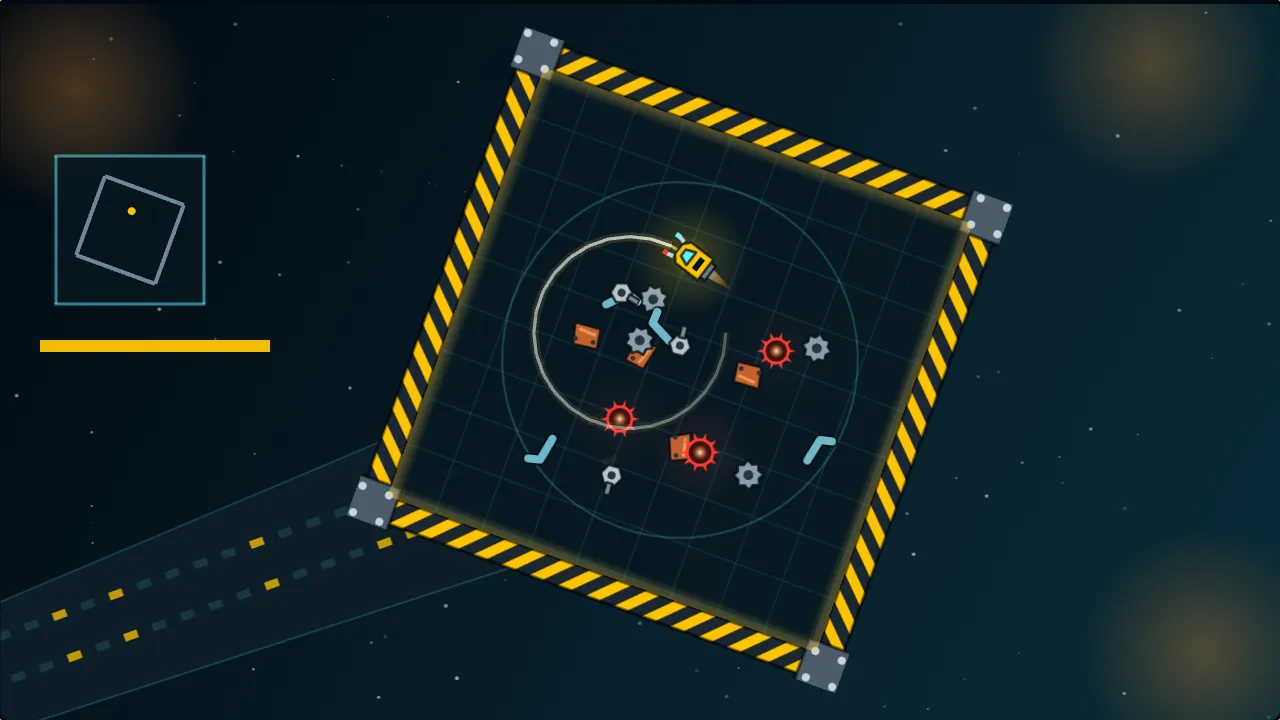
Turbo Juggler: One More Run is a quick arcade game set in a tiny spacecraft scrapyard. You fly a small yellow salvage tug inside a square steel frame that turns slowly in space. The tug never stops: you steer it left and right, and you can hold a boost for a burst of speed. Behind it trails a glowing tether that fades after a few seconds, and that tether is your whole toolkit. Fly across your own tether and you close a loop, and every piece of scrap floating inside the loop is hauled in at once.
The more pieces you catch in a single loop, the more each one is worth, so the best runs are made of a few fat loops rather than many small ones. The yard fights back. Red slag mines float among the scrap: one inside your loop pops and halves the haul, and one the tug touches wrecks a hull point. The frame’s four walls take turns to charge, blinking amber, and then strike red, and a live wall zaps the tug. A wall that is dark only bounces it back, so the walls are a hazard only when they are lit.
A run is three short yards and lasts about a minute, with three hull points to spare, so there is always time for one more run. Haul six or more pieces in one loop for a Big Haul: the hull is mended, time slows for a moment and everything pays double for a few seconds. Each night adds a rule of its own, tonight’s shift is the same for everyone, and your best run of it is kept as a ghost tug beside you.
How to play
- Steer the tug with the left and right arrows or A and D, a controller’s left stick, or the on-screen pair. It always flies forward.
- Hold Space, Enter, the up arrow, Shift, Ⓐ or the Boost button to fly faster and loop wider. Boost runs out and refuels.
- Cross your own glowing tether to close a loop. Everything inside is hauled in, and big loops pay far more per piece.
- Avoid red mines. One inside a loop pops and halves the haul, and one the tug touches costs a hull point.
- Walls charge amber and then strike red. A live wall zaps the tug; a dark wall only bounces it.
- Haul six or more pieces in one loop for a Big Haul that mends the hull and doubles your points for a few seconds.
Controls
- Left and right arrows or A and D, left stick, the on-screen pair — steer
- Hold Space, Enter, up arrow or Shift, Ⓐ or RT, the Boost button — boost
- P, Escape or Start — pause
Frequently asked questions
How do I close a loop?
Fly so that the tug crosses the glowing tether it left behind a moment ago. The loop between the crossing and the tug is closed at once, and the scrap inside it is hauled in. A loop has to be big enough to count, and the tether fades after a few seconds, so loop soon.
Why did a loop pay less than I expected?
A mine inside the loop pops and halves the haul. Each piece in a loop is worth more the more pieces share it, so a loop that catches a mine and a few pieces pays little.
What do the walls do?
Each wall blinks amber while it charges and then strikes red for a moment. A live wall zaps the tug and costs a hull point. A wall that is not lit just bounces the tug back in.
What is a Big Haul?
A single loop with six or more pieces. It mends one hull point, slows time for a moment and doubles everything you score for a few seconds.
Can I slow it down?
Yes. In Settings, Pace: Relaxed runs at three-quarter speed, Assist makes pieces easier to touch and the warnings longer, and you can make Boost a toggle instead of a hold.
Related games
All Arcade games → Snake Eat the prisms, chain them for big points, and never bite your own tail. Pro game
 Breakout Bounce, break and clear every brick before you run out of lives. Pro game
 Pong Rally the ball past the computer paddle to win the match. Pro game
 Turbo Pulse: Score After Dark Turn the cage, hop the crate, and be off the wall before it goes live. Pro game
 Whack-a-Mole Bonk the moles before they duck back down, and catch the golden one for a Frenzy. Pro game
 Neon Pulse: Score After Dark Scan the parcels, bank the stack, and never let the night shift beat you. Pro game