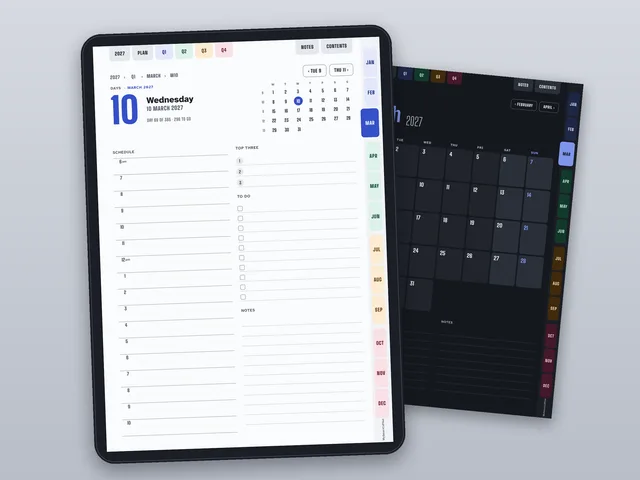

2027 Digital Planner for tablets (hyperlinked PDF)
Year, quarters, months, weeks and days joined by tabs and links: portrait or landscape, light or dark, Monday or Sunday
- From MySmartCoPilot
- ZIP
- Text
- 466 pages
Plan 2027 on your tablet, a page for every day, week and month, each at most two taps from any other.
Price ₹199 / $6.99 One-time payment, any tax included
Download straight after paying. Yours to keep.
What’s inside
- 8 planner files (PDF), 466 pages eachportrait or landscape, light or dark pages, weeks starting on Monday or on Sunday; A4 pages, tagged PDF with a bookmark for every page
- Tabs and links on every page12 month tabs, top tabs to the year, the year plan, the quarters, your notes and the contents, breadcrumbs and previous and next; 24,661 to 26,640 links in each file
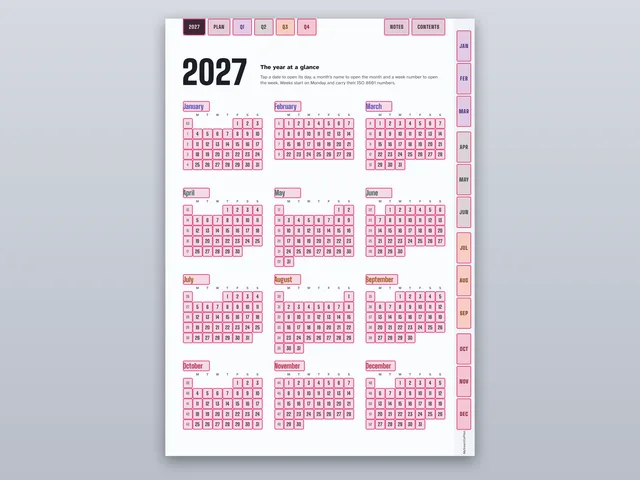
- The yearthe year at a glance, where every date opens its day, and a year plan with a box for each month
- 4 quarter pagesgoals for the quarter and its three months with lines for plans
- 12 month pagesa calendar with a tile for every day, a handle for each week (with ISO week numbers in the Monday files), priorities and notes
- 53 week pagesseven day boxes with writing lines and a list for the week
- 365 day pagesa schedule from 6 am to 10 pm, your top three, a to-do list, notes and the month in small with the day marked
- Notesan index with a title line for each of 20 notes pages: lined, dot grid, squared and blank
- 88 stickerson two sticker pages inside each planner and as PNG files with transparent backgrounds: labels, icon badges, tapes, sticky notes, page flags and highlighter strokes
- 8 covers (PNG)two designs in portrait and landscape, light and dark, 1654 × 2339 pixels (2339 × 1654 in landscape)
- The guide (PDF, 5 pages)which file to choose, how to put it in your note app, how the links work, what each page is for and how the dates were checked
- Licence and changelogas text files
| File | Format | Size |
|---|---|---|
| MySmartCoPilot-Digital-Planner-2027-Portrait-Light-Monday-v1.0.pdf | 3.3 MB | |
| MySmartCoPilot-Digital-Planner-2027-Portrait-Light-Sunday-v1.0.pdf | 3.1 MB | |
| MySmartCoPilot-Digital-Planner-2027-Portrait-Dark-Monday-v1.0.pdf | 3.3 MB | |
| MySmartCoPilot-Digital-Planner-2027-Portrait-Dark-Sunday-v1.0.pdf | 3.1 MB | |
| MySmartCoPilot-Digital-Planner-2027-Landscape-Light-Monday-v1.0.pdf | 3.2 MB | |
| MySmartCoPilot-Digital-Planner-2027-Landscape-Light-Sunday-v1.0.pdf | 3.1 MB | |
| MySmartCoPilot-Digital-Planner-2027-Landscape-Dark-Monday-v1.0.pdf | 3.2 MB | |
| MySmartCoPilot-Digital-Planner-2027-Landscape-Dark-Sunday-v1.0.pdf | 3.1 MB | |
| MySmartCoPilot-Digital-Planner-2027-Guide-v1.0.pdf | 299 KB | |
| MySmartCoPilot-Digital-Planner-2027-Covers-PNG-v1.0.zip | ZIP | 269 KB |
| MySmartCoPilot-Digital-Planner-2027-Stickers-PNG-v1.0.zip | ZIP | 712 KB |
| MySmartCoPilot-Digital-Planner-2027-Licence-v1.0.txt | Text | 3 KB |
| MySmartCoPilot-Digital-Planner-2027-Changelog-v1.0.txt | Text | 233 bytes |
Works with
| App | Versions | Checked |
|---|---|---|
| Note-taking apps | apps on tablets that import PDF files and follow their links A4 pages whose links all jump within the same file. Some note apps may follow links only with a finger or in a reading or view mode; we name an app only after testing the file in it | Made for |
| PDF readers | any PDF reader on a tablet, phone or computer Tagged PDF/UA-1 files with a bookmark for every page; every link of every file followed by four different PDF engines and clicked in a PDF viewer | Made for |
| Image apps and sticker libraries | any app that opens PNG pictures 88 stickers with transparent backgrounds at 300 pixels per inch, and 8 covers | Made for |
“Tested” means we opened and checked the file in that app and kept the record. “Made for” means it follows that app’s documented format. No DRM: the file is yours to keep.
Try a sample

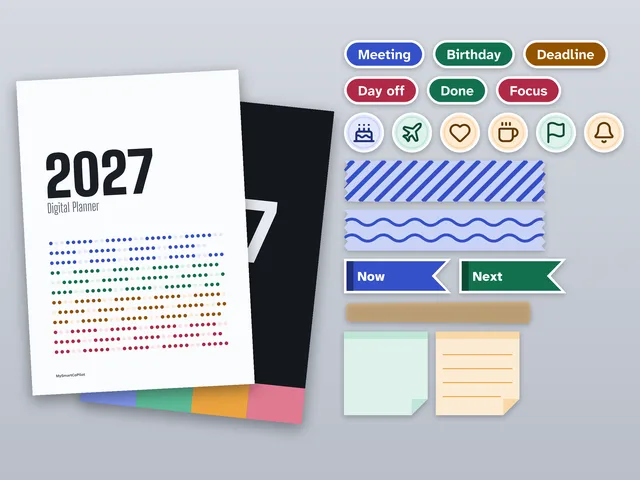
5 of the 466 pages shown here.
How it helps
Every page two taps away
Month tabs run down the right edge of every page and the top tabs open the year, the year plan, the quarters, your notes and the contents. Tap a date on a month or in a small calendar to open that day, and use the breadcrumbs and the previous and next buttons to move up and along. Wherever you are in the year, any other page is at most two taps away, so you spend your time planning, not scrolling.
Room to write, page by page
Each day has a schedule from 6 am to 10 pm with half-hour lines in portrait, your top three, a to-do list with check boxes, notes and the month in small with the day marked. Each week has seven day boxes and a list for the week; each month a calendar, priorities and notes; each quarter its goals and plans; and the year plan has a box for every month.
Portrait or landscape, light or dark, Monday or Sunday
Eight files come in the download, so the planner fits the way you hold your tablet, the page colour you prefer and the day your week starts. The Monday files carry ISO 8601 week numbers; the Sunday files name each week by its dates. Dark pages are easy on the eyes at night with a light pen colour.
Light to open and write on
Each planner file is 3.3 MB to 3.4 MB: every page is drawn as vector shapes and text, with no photographs or pixel images, so it downloads quickly and stays light in your note app.
Checked before it reaches you
Every link of every file was followed by four PDF engines and clicked in a PDF viewer, and lands on the page it names. Every date, weekday, week number and day count was compared with three separate calendar calculations, and every page was drawn by three PDF engines and looked at.
Licence
Personal licence. Use it for yourself, in your own learning, projects and job, on all your devices.
- Personal use
- Lifetime use of this version
- Free fixes
- No resale
Lifetime use of the version you download. Fixes of errors in your edition are free from your order page. Read the full licence.
Refunds and your rights
Because the file is ready the moment you pay, we don’t refund a purchase once its download has started, unless the file is faulty or not as described: then we fix it, send you a corrected file or refund you. If you live in the EU, the EEA or the UK, you can withdraw from your purchase until your download starts, and you keep every right the law gives you.
Your legal guarantee: if a file is faulty or not as described, we repair it, replace it or refund you.
Delivery and paying
Download straight after paying, on this page and by e-mail. Nothing is shipped. Sold in the countries where a way to pay shows on this page.
You can download your files again from your order page whenever you need them. If we ever stop offering downloads, we’ll e-mail you at least 90 days before so you can save your copy.
- In rupees: UPI, cards or netbanking on Razorpay’s secure page. MySmartCoPilot sells the file to you.
- In US dollars: card or wallet with Dodo Payments, which sells the file to you as merchant of record and e-mails your receipt or invoice.
- In US dollars with PayPal, where it is offered. MySmartCoPilot sells the file to you.
Bought once, separately from passes. How the Digital Store and passes differ.
Questions
Which note apps does it work with?
It is a standard PDF whose links jump between its own pages, made for note-taking apps that import PDFs and follow their links, and for any PDF reader. We name an app only after we have tested the file in it ourselves. If a tap writes instead of jumping, your app may follow links only with a finger or in a reading or view mode.
Which file should I use?
The one for the way you hold your tablet (portrait or landscape), the page colour you like (light or dark) and the day your week starts (Monday or Sunday). All eight are in your download, and the guide has a table of them.
Which dates does it cover?
Every day of 2027, from Friday 1 January to Friday 31 December. The first and last weeks also show the last days of 2026 and the first of 2028, in grey and without day pages.
How are the weeks numbered?
In the Monday files by ISO 8601: weeks run Monday to Sunday and week 1 is the week with the year's first Thursday, so Friday 1 to Sunday 3 January belong to week 53 of 2026. The Sunday files run weeks Sunday to Saturday and name them by their dates, without numbers.
Does it show holidays?
No. No holidays or festivals are printed, so the planner works in any country; write in your own.
Can I add more pages?
Note apps can usually add or copy pages. A copy shows the same tabs; whether its links still work depends on the app. The notes index links only to the 20 notes pages that come with the file.
How do I use the stickers and covers?
Copy a sticker from the sticker pages with your app's lasso or selection tool, or add the PNG files to your app's sticker or picture library. Choose a cover picture in a note app that lets you set one; every planner file also opens on its own cover page.
Can I print it?
It is made for screens: the pages are A4 and print on A4 paper at actual size, but the tabs run close to the edge, where many printers leave a margin.
What may I do with it?
Use it yourself, on all your own devices, for as long as you like. The personal licence (dsl-1) does not allow sharing, reselling, uploading or AI training; the full text is in the download.
Versions
- Version 1.0: First edition.
Related
Prefer it online?
- Week Number Calculator: Today’s week number, the week of any date and the dates of any week.
- Day of the Week Calculator: The weekday of any date, worked out step by step, in the Gregorian or Julian calendar.
- Date Calculator: Days between dates, working days, and any date plus or minus a duration.
More files in Planners and Lifestyle.