
Personal Budget Spreadsheet
A year of budgeting in one workbook: works with Microsoft Excel, Google Sheets and LibreOffice Calc
- From MySmartCoPilot
- XLSX
- Text
- 12 sheets
- 13 pages
Plan a year of money in, saving and spending, log what really happens, and see every month and the year against your plan, in a file you keep.
Price ₹49 / $1.99 One-time payment, any tax included
Download straight after paying. Yours to keep.
What’s inside
- Plan: room for 60 categories in three blocksmoney in (8 rows), saving and investing (8) and spending (44), each with a usual amount and its own figure for any month; starter categories for a household, all renamable, in 12 spending groups
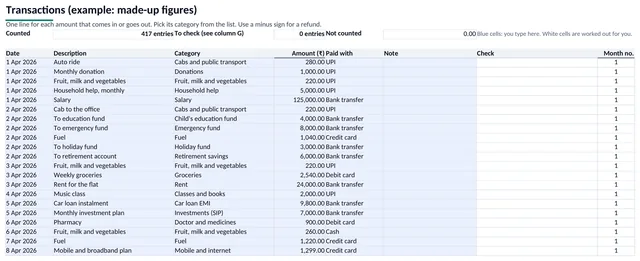
- Transactions: 2,000 rows readydate, description, category from a list, amount, how you paid and a note; a Check column says why an entry is not counted, and the top line shows the entries counted, the ones to check and the amount not counted
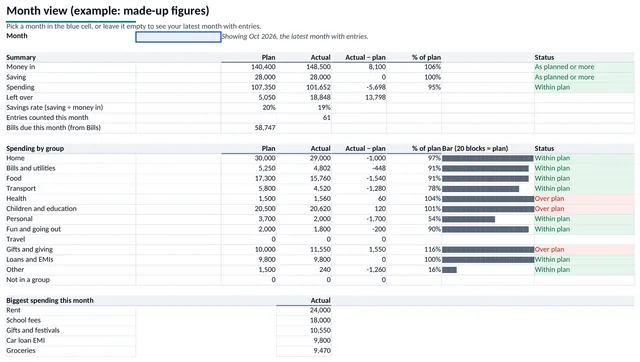
- Month viewany month against your plan: money in, saving, spending, left over and savings rate; spending by group with 20-block bars; your five biggest costs; every category with its status in words
- Year viewtwelve months side by side for every category and group, with the total so far, the average a month, the plan for the year and the plan so far
- Dashboard: readouts and 4 chartsthe year so far in five figures, a month you pick, and charts of money in, saving and spending by month, spending by group, plan against spending for the month, and savings goals
- Bills: 30 rowsbills due every month, every 2, 3, 4 or 6 months or once a year, placed in the months they fall due, with the year's total and what to set aside each month
- Goalsa target and a date for each saving category: what is still needed, the months left and what it needs each month against your plan
- Any first month, any currencya budget year from January, from April or from any month; the currency symbol or code you type shows in the headings
- Example workbookthe same workbook filled with a made-up household's 7 months: 417 entries, 9 bills and 3 goals, to see every sheet working before you type your own
- The guide: 13 pages (PDF)three steps to start, every sheet explained with pictures from the example, a ten-minute monthly review, common ways to use a budget, and questions and fixes
- Licence and changelogas text files
| File | Format | Size |
|---|---|---|
| MySmartCoPilot-Personal-Budget-v1.0.xlsx | XLSX | 248 KB |
| MySmartCoPilot-Personal-Budget-Example-v1.0.xlsx | XLSX | 260 KB |
| MySmartCoPilot-Personal-Budget-Guide-v1.0.pdf | 197 KB | |
| MySmartCoPilot-Personal-Budget-Licence-v1.0.txt | Text | 3 KB |
| MySmartCoPilot-Personal-Budget-Changelog-v1.0.txt | Text | 621 bytes |
Works with
| App | Versions | Checked |
|---|---|---|
| Microsoft Excel | 2016 or later on Windows and Mac; Excel for the web The .xlsx format; its 30 functions are all on Microsoft's Excel function list with no version mark; no macros, add-ins or links to other files | Made for |
| Google Sheets | in a web browser Upload the file to Google Drive and open it with Google Sheets. Its functions are all on Google's function list; Excel's sheet protection does not carry over, so type only in the blue cells | Made for |
| LibreOffice Calc | 26.8 on macOS LibreOffice Calc recalculated every formula in 28 test cases, from an empty workbook to all 2,000 rows, each first month of the year and leap days: 293,053 formula cells, each equal to our reference figures | Tested |
| PDF readers | any PDF reader on a computer, tablet or phone The guide is a tagged PDF with bookmarks, real text and alt text for every figure | Made for |
“Tested” means we opened and checked the file in that app and kept the record. “Made for” means it follows that app’s documented format. No DRM: the file is yours to keep.
Try a sample
Three small examples typed into the workbook. The Check, Month no. and every figure below them are what the workbook's own formulas worked out (recalculated in LibreOffice Calc). Made-up amounts in rupees.
| Date | Description | Category | Amount | Check | Month no. |
|---|---|---|---|---|---|
| 1 Jan | Salary | Salary | 60,000.00 | 1 | |
| 2 Jan | To emergency fund | Emergency fund | 6,000.00 | 1 | |
| 3 Jan | Rent for the flat | Rent or home loan | 18,000.00 | 1 | |
| 6 Jan | Weekly groceries | Groceries | 2,140.00 | 1 | |
| 9 Jan | Mobile plan | Mobile and internet | 799.00 | 1 | |
| 13 Jan | Weekly groceries | Groceries | 1,985.50 | 1 | |
| 15 Jan | Electricity bill | Electricity | 1,920.00 | 1 | |
| 18 Jan | Dinner out | Eating out and delivery | 1,350.00 | 1 | |
| 20 Jan | Fuel | Fuel | 1,200.00 | 1 | |
| 24 Jan | Refund: grocery order | Groceries | -320.00 | 1 | |
| 27 Jan | Weekly groceries | Groceries | 2,310.00 | 1 |
You type here: the shaded cells are the ones you fill in.
- Money in this month: 60,000
- Saving: 6,000
- Spending: 29,385
- Left over: 24,616
- Savings rate: 10%
- Groceries: 6,116 of 8,000: Within plan
- Electricity: 1,920 of 1,800: Over plan
- Entries counted: 11 entries
Every number here was worked out by the workbook itself, from the sample data it ships with.
5 of the 13 pages shown here.
How it helps
One list feeds every view
Log each amount once, on the Transactions sheet: its date, its category and the amount. Month view, Year view and the Dashboard update by themselves, so there are no twelve copies of a month to keep in step.
Every entry accounted for
The Check column says why an entry is not counted: a date outside your budget year, a category that is not on your Plan sheet or an amount that is not a number. The line above the entries shows how many are counted and the amount not counted, so you know your totals are complete.
Plan the year your way
Start the year in January, in April or in any month. Give each category a usual amount and change any month that differs, such as a yearly premium or term fees. Bills due every 1, 2, 3, 4, 6 or 12 months show in the months they fall due, with what to set aside each month.
Checked formula by formula
LibreOffice Calc recalculated every formula in 28 test cases, from an empty workbook to all 2,000 rows, every first month of the year and leap days, and matched our reference figures in all 293,053 formula cells.
Your figures stay with you
The workbook has no macros, no scripts, no links to other files and no connection to the internet: it only adds up what you type. General information for your own planning, not financial, tax or legal advice. Check the current rules that apply to you before you rely on a figure.
Licence
Personal licence. Use it for yourself, in your own learning, projects and job, on all your devices.
- Personal use
- Lifetime use of this version
- Free fixes
- No resale
Lifetime use of the version you download. Fixes of errors in your edition are free from your order page. Read the full licence.
Refunds and your rights
Because the file is ready the moment you pay, we don’t refund a purchase once its download has started, unless the file is faulty or not as described: then we fix it, send you a corrected file or refund you. If you live in the EU, the EEA or the UK, you can withdraw from your purchase until your download starts, and you keep every right the law gives you.
Your legal guarantee: if a file is faulty or not as described, we repair it, replace it or refund you.
Delivery and paying
Download straight after paying, on this page and by e-mail. Nothing is shipped. Sold in the countries where a way to pay shows on this page.
You can download your files again from your order page whenever you need them. If we ever stop offering downloads, we’ll e-mail you at least 90 days before so you can save your copy.
- In rupees: UPI, cards or netbanking on Razorpay’s secure page. MySmartCoPilot sells the file to you.
- In US dollars with PayPal, where it is offered. MySmartCoPilot sells the file to you.
Bought once, separately from passes. How the Digital Store and passes differ.
Before you buy
General information for your own planning, not financial, tax or legal advice. Check the current rules that apply to you before you rely on a figure.
Questions
Does it work in Google Sheets?
Yes, it is made for it: upload the .xlsx file to Google Drive and open it with Google Sheets. Google Sheets does not keep Excel's sheet protection, so type only in the blue cells.
Which versions of Excel does it need?
Excel 2016 or later on Windows or Mac, or Excel for the web. It uses no macros, no add-ins and none of the newer functions such as XLOOKUP or FILTER.
My financial year starts in April. Does it fit?
Yes. Choose April as the first month on the Setup sheet and every sheet follows it. Any other first month works too.
Can I use my own currency?
Yes. Type any symbol or code of up to 6 characters, for example ₹, $, € or AED. Amounts are plain numbers, so any currency works.
How many transactions does it hold?
2,000 rows, a year for most households. The guide shows how to add more rows; most people start a fresh copy each year.
How is it different from the Budget Planner tool on MySmartCoPilot?
The Budget Planner plans one month in your browser. This workbook covers twelve months, keeps your transactions, compares plan and actual for every category, group and month, places your bills in the months they fall due and tracks savings goals, in a file you keep.
Is my data sent anywhere?
No. Your figures stay in the file on your own device. The workbook has no macros, no scripts, no links to other files and no connection to the internet.
Is it financial advice?
No. It organises and adds up your own figures. General information for your own planning, not financial, tax or legal advice. Check the current rules that apply to you before you rely on a figure.
Versions
- Version 1.0: First edition: the workbook (12 sheets, 2,000 transaction rows, 4 charts), the example workbook, the guide (13 pages), the licence and the changelog.
Related
Prefer it online?
- Budget Planner (50/30/20): Give all your income a job — and see how your plan compares with 50/30/20.
- Debt Payoff Planner (Snowball vs Avalanche): Your debt-free date, the order to pay, and what each method saves.
More files in Business Tools.
Microsoft and Excel are trademarks of the Microsoft group of companies. Google Sheets is a trademark of Google LLC. LibreOffice is a registered trademark of The Document Foundation. MySmartCoPilot is not affiliated with or endorsed by them. All other trademarks are the property of their respective owners.