

Business Bookkeeping Spreadsheet
Works with Microsoft Excel, Google Sheets and LibreOffice Calc
- From MySmartCoPilot
- XLSX
- Text
- 14 sheets
- 33 pages
- 16 chapters
Keep your business's books in one workbook: money in and out, invoices and bills, monthly profit, tax on sales and purchases, what is owed and a bank reconciliation.
Price ₹199 / $4.99 One-time payment, any tax included
Download straight after paying. Yours to keep.
What’s inside
- Workbook (.xlsx): 14 sheetsStart here, Setup, Categories, Tax rates, Transactions, Invoices, Bills, Reconcile, Dashboard, Profit and loss, Tax summary, Sample rows, Help, Licence
- Transactions: 2,000 rowsdate, account, description, customer or supplier, category, money in or out, tax code, invoice or bill number and Cleared; the tax inside each amount worked out for you, and a Check column that says what to fix in any row
- Invoices and Bills: 500 rows eachamount before tax, tax and total; money received or paid, read from Transactions; what is still owed; status (Paid, Part paid, Overdue and more); days overdue; ageing by 1 to 30, 31 to 60, 61 to 90 and over 90 days
- Reconcileany account against its statement: the difference and the rows the bank has not shown yet
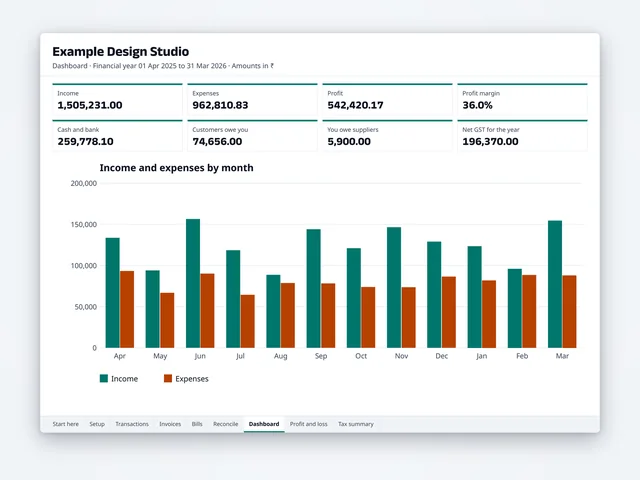
- Dashboard: 8 totals and 3 chartsincome, expenses, profit, margin, cash and bank, what customers owe, what you owe suppliers and net tax; income and expenses by month, cash at each month end, the largest expense categories
- Profit and lossby month and category (up to 25 income and 60 expense categories), other money movements kept apart, cash at each month end and a check against your accounts
- Tax summarytax on sales and purchases by month, tax paid to or refunded by the government, and tax by code for the months you choose, with both halves of a split tax such as CGST and SGST
- Your lists77 category rows, 30 of them filled with ready-made categories you can change, plus the 3 fixed ones; 24 tax-code rows with 8 example codes, plus No tax; up to 8 money accounts (bank, cash, card, wallet)
- Example workbookthe same workbook filled with a year of an invented design studio's books: 292 payments, 41 invoices and 17 bills, reconciled, with every report filled in
- PDF guide: 33 pages16 chapters, from setting up to the year end, with worked examples, routines, 20 questions and fixes, a glossary and the official sources of its facts
- Licence and changelogas plain text files
| File | Format | Size |
|---|---|---|
| MySmartCoPilot-Business-Bookkeeping-v1.0.xlsx | XLSX | 1.1 MB |
| MySmartCoPilot-Business-Bookkeeping-Example-v1.0.xlsx | XLSX | 1.2 MB |
| MySmartCoPilot-Business-Bookkeeping-Guide-v1.0.pdf | 613 KB | |
| MySmartCoPilot-Business-Bookkeeping-Licence-v1.0.txt | Text | 4 KB |
| MySmartCoPilot-Business-Bookkeeping-Changelog-v1.0.txt | Text | 657 bytes |
Works with
| App | Versions | Checked |
|---|---|---|
| Microsoft Excel | 2016 or later on Windows and Mac, Microsoft 365 and Excel for the web The .xlsx format; 26 functions, all in Excel 2016 and later; no macros, add-ins, data connections or links to other files | Made for |
| Google Sheets | in a web browser Upload the file to Google Drive, then open it with Google Sheets. Only functions Google Sheets also has; Excel's sheet protection may not carry over, so type only in the blue cells | Made for |
| LibreOffice Calc | 26.8.2 on macOS LibreOffice Calc recalculated all 43,428 formulas in 36 test files, from the empty workbook to every check message, and matched our reference figures in every cell. Made for LibreOffice Calc 7 or later | Tested |
| PDF readers | any PDF reader on a computer, tablet or phone The guide is a tagged PDF/UA-1 file with bookmarks, real text and alt text for every figure | Made for |
| Printing | A4 paper; US Letter with fit to page The guide is set on A4; every sheet of the workbook prints one page wide, the wide ones in landscape | Made for |
“Tested” means we opened and checked the file in that app and kept the record. “Made for” means it follows that app’s documented format. No DRM: the file is yours to keep.
Try a sample
Three small months typed into the workbook (made-up amounts: rupees with GST, the third in pounds with VAT). The figures below each are what the workbook’s own formulas worked out.
| Description | Category | Money in | Money out | Tax code |
|---|---|---|---|---|
| Client project paid | Sales of services | ₹47,200.00 | GST 18% | |
| Workshop seats | Sales of services | ₹4,720.00 | GST 18% | |
| Fibre internet | Phone and internet | ₹1,180.00 | GST 18% | |
| Design software | Software and subscriptions | ₹4,130.00 | GST 18% | |
| Studio rent | Rent | ₹12,000.00 | ||
| Owner's drawings | Owner took money out | ₹15,000.00 |
You type here: the shaded cells are the ones you fill in.
- Income: ₹44,000.00
- Expenses: ₹16,500.00
- Profit: ₹27,500.00
- Tax on sales: ₹7,920.00
- Tax on purchases: ₹810.00
- Net tax: ₹7,110.00
- Cash and bank at month end: ₹44,610.00
- Customers owe you: ₹0.00
Every number here was worked out by the workbook itself, from the sample data it ships with.
5 of the 33 pages shown here.
How it helps
One place for every payment
Type each payment in or out on Transactions: the date, the account, what it was for and the amount that moved. The workbook works out the tax inside it, the month it belongs to and where it counts, and a Check column says what to fix in any row that isn't complete. Your books stay in your own file, on your own computer or drive.
Invoices and bills that mark themselves paid
List the invoices you send and the bills you receive. Record a payment with its invoice or bill number and the sheet marks it paid, part paid or overdue, counts the days overdue and groups what is still owed by how late it is, so you know whom to remind and what to pay next.
Profit, tax and cash, month by month
Profit and loss adds up income and expenses by category for each month of your financial year, keeps owner money, loans, equipment and tax payments apart, and follows your cash and bank to the last day. Tax summary totals the tax on sales and purchases by month, and by tax code for any months you choose, with both halves of a split tax such as CGST and SGST.
Books that agree with the bank
Once a month, choose an account, type the statement's closing balance and mark the rows that appear on it. Reconcile shows the difference and the rows the bank hasn't shown yet, so a missing fee or a typing mistake is found while it is still easy to fix.
Made for GST, VAT, sales tax or no tax
Set your financial year, currency and tax name. Example codes cover India's GST and IGST and the UK's VAT rates; add your own rates for any country, or leave tax out. Choose whether invoices and bills count on their own date or when they are paid.
Learn on a finished year first
The example workbook holds a year of an invented design studio's books, reconciled and with every report filled in, and the illustrated guide explains every sheet step by step, with weekly, monthly and year-end routines.
Licence
Commercial licence. Use it for yourself, in your business and in finished work for your clients.
- Personal and business use
- Client work allowed
- Lifetime use of this version
- Free fixes
- No resale
Lifetime use of the version you download. Fixes of errors in your edition are free from your order page. Read the full licence.
Refunds and your rights
Because the file is ready the moment you pay, we don’t refund a purchase once its download has started, unless the file is faulty or not as described: then we fix it, send you a corrected file or refund you. If you live in the EU, the EEA or the UK, you can withdraw from your purchase until your download starts, and you keep every right the law gives you.
Your legal guarantee: if a file is faulty or not as described, we repair it, replace it or refund you.
Delivery and paying
Download straight after paying, on this page and by e-mail. Nothing is shipped. Sold in the countries where a way to pay shows on this page.
You can download your files again from your order page whenever you need them. If we ever stop offering downloads, we’ll e-mail you at least 90 days before so you can save your copy.
- In rupees: UPI, cards or netbanking on Razorpay’s secure page. MySmartCoPilot sells the file to you.
- In US dollars with PayPal, where it is offered. MySmartCoPilot sells the file to you.
Bought once, separately from passes. How the Digital Store and passes differ.
Before you buy
General information for your own planning, not financial, tax or legal advice. Check the current rules that apply to you before you rely on a figure.
Questions
Which apps does it work with?
It is made for Microsoft Excel 2016 or later on Windows and Mac (including Microsoft 365 and Excel for the web) and for Google Sheets in a web browser: upload the file to Google Drive, then open it with Google Sheets. It was tested in LibreOffice Calc, which recalculated every formula and matched our reference figures in every cell. No macros, add-ins or internet connection are needed.
Is it accounting software or a tax return?
No. It is a bookkeeping workbook that adds up what you type: a cash book with invoice and bill lists. It doesn't file returns, connect to a bank or give tax, legal or accounting advice. Tax rules and rates change: check them with your tax authority or an adviser before you file.
Can I use it for GST in India or VAT in the UK?
Yes, as a record of your figures. The Tax rates sheet holds example GST, IGST and VAT codes at the rates their official sources publish, splits a code into two halves where you choose (such as CGST and SGST), and Tax summary adds up the tax by month and by code. Check the rate of each item you sell or buy before you rely on it.
How many rows does it hold?
2,000 transactions, 500 invoices and 500 bills, which is a year for most small businesses. The guide shows how to add more rows, or you can start a new file each year.
Can I keep my clients' books with it?
Yes. It comes with the commercial licence: keep your own business's books and the books of the businesses you keep books for, in any number of businesses. The blank workbook stays yours: it can't be shared, resold or given away.
Does it work on a phone?
The Excel and Google Sheets apps open it and you can type rows there; a computer is easier for many rows.
What if something doesn't work?
Write to support@mysmartcopilot.com. If a file is faulty or not as described, we fix it, send you a corrected file or refund you. Fixes of this edition are free from your order page.
Versions
- Version 1.0: First edition: the workbook with 14 sheets, the example workbook and the PDF guide.
Related
Prefer it online?
- Bookkeeping Ledger & Financial Statements: Double-entry books on your device, from vouchers to trial balance, P&L and cash flow.
- GST Calculator (India): Add or remove GST, see CGST + SGST or IGST, and total a whole invoice.
- Invoice Generator: Invoices with your country’s tax and the amount in words; the PDF with a Premium pass.
More files in Business Tools.
Microsoft and Excel are trademarks of the Microsoft group of companies. Google Sheets is a trademark of Google LLC. LibreOffice is a registered trademark of The Document Foundation. MySmartCoPilot is not affiliated with or endorsed by them. All other trademarks are the property of their respective owners.